
基本上所有的主机提供商都会提供免费的Linux系统以供安装使用,如CentOS、Debian、Ubuntu等。那为什么我们还要使用一键DD脚本重装/更换系统呢?
1.商家提供的系统版本有限,可能没有自己需要的版本;
2.Windows系统通过正规渠道安装需要收费
3.商家提供的系统大多都是改装过的,不纯净,可能存在软件兼容行问题;
4.商家提供的系统大多带有监控,特别是某里云,某鹅云,卸载监控和排查后门不是那么简单的。
注意:重装系统将抹掉所有数据,并可能导致服务器无法开机!所以请确保服务器上所有文件和数据库都已备份完成!请谨慎操作!
方案一:
使用beta.gs一键脚本安装体统
支持性好,更智能更全面,支持国内外各种VPS重装,特别是对国内各种访问国外资源慢的VPS安装有奇效。
注:有些系统默认不是root用户,则使用以下命令切换root
sudo -i
安装重装系统的前提组件:
Debian/Ubuntu:
apt-get install -y xz-utils openssl gawk file wget screen && screen -S os
RedHat/CentOS:
yum install -y xz openssl gawk file glibc-common wget screen && screen -S os
如果出现异常,请刷新Mirrors缓存或更换镜像源。
RedHat/CentOS:
yum makecache && yum update -y
Debian/Ubuntu:
apt update -y && apt dist-upgrade -y
最后使用:
wget --no-check-certificate -O NewReinstall.sh https://git.io/newbetags && chmod a+x NewReinstall.sh && bash NewReinstall.sh
如为CN主机(部分主机商已不能使用),可能出现报错或不能下载脚本的问题,可执行以下命令开始安装.
wget --no-check-certificate -O NewReinstall.sh https://cdn.jsdelivr.net/gh/fcurrk/reinstall@master/NewReinstall.sh && chmod a+x NewReinstall.sh && bash NewReinstall.sh
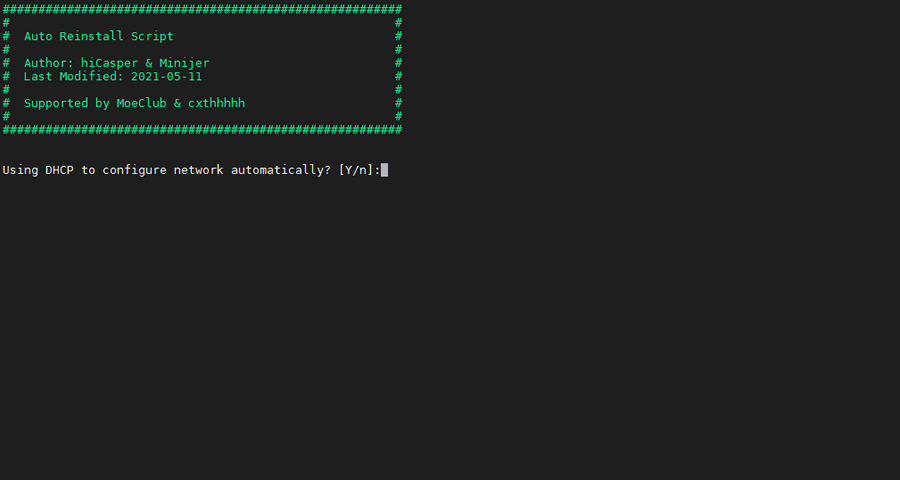
输入Y确认DD后主机自动获取IP,N则自行设置IP 输入N后会自动检测出主机现用IP,如果正确可以按Y确认使用,如不正确则按N自行按正确的输入。
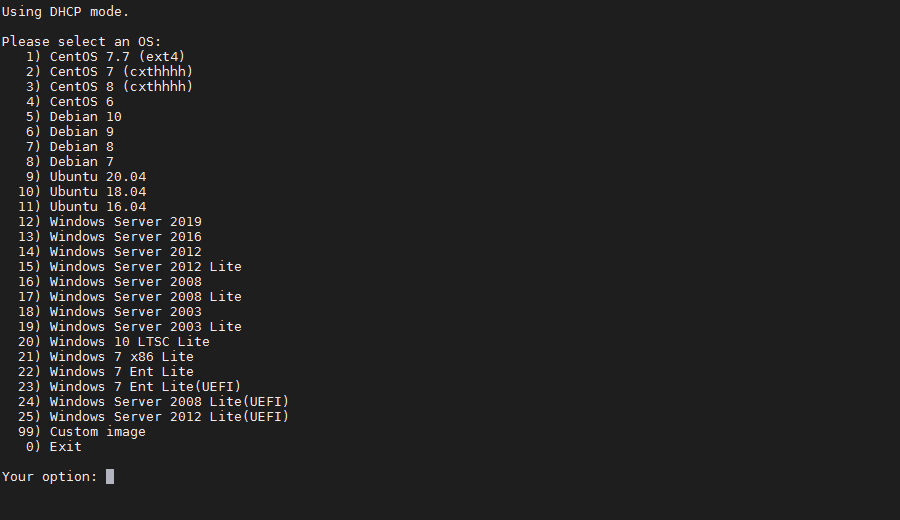
25合1的系统一键DD选择界面,输入99则使用自定义镜像。 以上系统密码不为默认密码的均为网络收集,如有疑虑使用自己的自定义镜像。
25合一系统密码:
1、CentOS 7.7 (已关闭防火墙及SELinux,默认密码Pwd@CentOS)
2、CentOS 7 (默认密码cxthhhhh.com)
3、CentOS 8 (默认密码cxthhhhh.com)
4、CentOS 6 (默认密码Minijer.com)
5、Debian 11 (默认密码Minijer.com)
6、Debian 10 (默认密码Minijer.com)
7、Debian 9 (默认密码Minijer.com)
8、Debian 8 (默认密码Minijer.com)
9、Ubuntu 20.04 (默认密码Minijer.com)
10、Ubuntu 18.04 (默认密码Minijer.com)
11、Ubuntu 16.04 (默认密码Minijer.com)
12、Windows Server 2019 (默认密码cxthhhhh.com)
13、Windows Server 2016 (默认密码cxthhhhh.com)
14、Windows Server 2012 (默认密码cxthhhhh.com)
15、Windows Server 2012 Lite (默认密码nat.ee)
16、Windows Server 2008 (默认密码cxthhhhh.com)
17、Windows Server 2008 Lite (默认密码nat.ee)
18、Windows Server 2003 (默认密码cxthhhhh.com)
19、Windows Server 2003 Lite (默认密码WinSrv2003x86-Chinese)
20、Windows 10 LTSC Lite (默认密码nat.ee)
21、Windows 7 x86 Lite (默认密码nat.ee)
22、Windows 7 Ent Lite (默认密码nat.ee)
23、Windows 7 Ent Lite (UEFI支持甲骨文)(默认密码nat.ee)
24、Windows Server 2008 Lite (UEFI支持甲骨文)(默认密码nat.ee)
25、Windows Server 2012 Lite (UEFI支持甲骨文)(默认密码nat.ee)
99、自定义镜像
注意:
经测试在谷歌云原版系统基础上DD会出现自动获取的子网掩码为255.255.255.255,如出现这种情况需要手工输入改正为正确的如255.255.255.0,否则会安装完成主机可能会离线。
Oracle Cloud(甲骨文云)可选择23-25一键DD,注意基础系统最好选择Ubuntu,如原系统是CentOS可能无法成功。4-11项安装原版系统,可自定义密码,密码要求8-16位,以英文字母或数字开头,可以是大小写英文字母、数字及7个特殊字符.!$@#&%的任意组合。
一键网络重装系统 – 魔改版
项目地址
最新版本:5.3.0(2022/07/18)
官方发布:https://cxthhhhh.com/network-reinstall-system-modify
Github:https://github.com/MeowLove/Network-Reinstall-System-Modify
【全球CDN加速】
wget --no-check-certificate -qO ~/Network-Reinstall-System-Modify.sh 'https://cxthhhhh.com/CXT-Library/Network-Reinstall-System-Modify/Network-Reinstall-System-Modify.sh' && chmod a+x ~/Network-Reinstall-System-Modify.sh && bash ~/Network-Reinstall-System-Modify.sh
【中国大陆加速】
wget --no-check-certificate -qO ~/Network-Reinstall-System-Modify.sh 'https://caoxiaotian.com/CXT-Library/Network-Reinstall-System-Modify/Network-Reinstall-System-Modify.sh' && chmod a+x ~/Network-Reinstall-System-Modify.sh && bash ~/Network-Reinstall-System-Modify.sh
